Visual CE® 12
Improve the way you gather, integrate, organize, and share information. Visual CE mobile database software is sophisticated enough for developers and easy enough for new users.
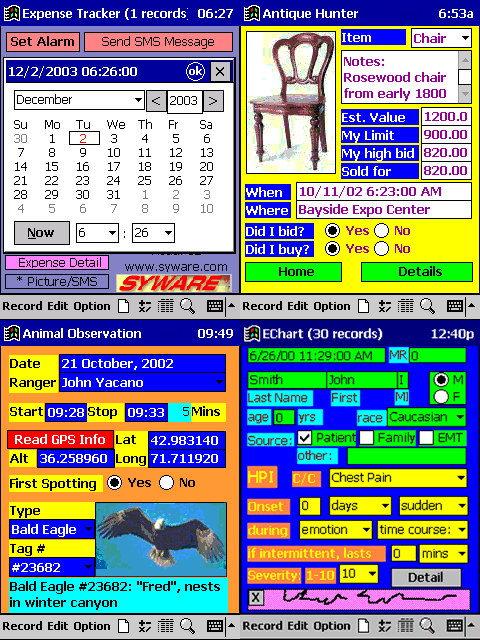
Use Visual CE, the award winning, "Go Anywhere" database, to build custom mobile database applications for any Windows Mobile, Pocket PC, Smartphone, or Windows CE device (touchscreen or non-touchscreen) quickly and easily. Eliminate paperwork and improve data accuracy, even centralize data. Simply decide what information you'll need, then drag and drop controls to create your custom electronic form, no programming required. After your data is collected, synchronize your device with your desktop PC or corporate server. Share data with popular ODBC-enabled software like Microsoft Access, SQL Server, Sybase, Oracle, or Visual Basic.
"Visual CE Mobile Database Software Offers a rapid and stable path to our mobile healthcare application that is 10 times faster than traditional development products such as Visual Basic or Visual C++. I can choose from a list of command sequences for functions like sorting, filtering, or communications. I don't have to write all the code behind the command buttons. It's already done in Visual CE."
-- Chuck Colley, President of Biologix-IT
Two Editions Available
- Personal Edition - The right choice for an individual user
- Professional Edition - Perfect if you have 3 or more users
If your requirements include reporting and printing or wireless/remote connections, please consider purchasing one of the SYWARE Mobile360 suites..
"Just wanted to drop a line or two and say Visual CE is the best. Believe me. I have tried to find a similar product that is better than Visual CE, and I have had no luck. If it can be found on the Web, I have found it and tried it and have found it wanting, compared to
Visual CE. Keep up the great work."
-- Tom Robinson, Mount Pleasant, MI
Visual CE Offers...
- Compatibility with all Windows Mobile devices: Pocket PC, Pocket PC Phone Edition, Smartphones, (Professional, Standard. and Classic devices) and Windows Mobile based tablets and specialized hardware
- Build a single application that runs on both touchscreen and non-touchscreen devices with only minor modifications.
- A fully relational database, predefined and custom filters, lookup controls
- Royalty-free distribution of created apps (Professional Edition and Mobile 360 Suites) (Does not include mEnable or sqlceEnable)
- Fast, smooth synchronization; synchronization of multiple handhelds to same desktop table
- Integration with mEnable® for real-time or occasional wireless access to ODBC-enabled server data
- Full GPS support for all NMEA-compatible devices
- A wide array of scalar functions (numeric, string, date, and time), including advanced calculations such as sine, cosine, exponent
- Design and run forms on the desktop or handheld
- Signature capture, Picture Storage, Navigable image maps
- Dependent and multi-select drop downs, macro programming
- The Northwind Mobile Traders template facilitating quick and easy creation of order entry, sales tracking, and inventory management applications
- Support for Symbol, Socket, Intermec and other third party scanners, card readers and peripherals
- Images can be added to buttons and arranged to form complex, navigable image maps
- Events and Alarms support
- Wizard to create distribution disks
- Custom Menu bars
- Moving files via mEnable wireless connection
- Support for outgoing and incoming SMS messages
- XML data transfer
- See our exhaustive list of features
.
New in Visual CE 12
- A macro debugger
- Tabs
- Data can be modified in list mode
- Data in a grid can be modified
- The synchronizer can synchronize different tables to different databases
- SKIP macro step: GO TO << label >>
- SKIP macro step: IF << condition >> THEN GO TO << label >>
- Faster macro execution
- Header line in OPTION | EXPORT and OPTION | IMPORT can be suppresed
- The currently selected item in a grid can be controled within a macro
- Forms can be locked during the creation of a redistributable
- Lookup controls can retrieve Boolean (Yes/No) values
- New GPS functions: @fixtype, @sat, @hdop, @geoheight, @diffgps, @diffref
- Better detection of the screen size